This guide contains affiliate links. We may earn a commission on purchases at no cost to you. Learn more
Best Monitor Arms for Mac Mini in 2026
The monitor arms and Mac mini mounting brackets that actually clear your desk in 2026, tested for stability, cable mess, and how well they hide a Mac mini behind your screen.
- 1★Best Overall

HUANUO FlowLift Pro
Tool-free setup and a smooth gas-spring arm that leaves plenty of room to add a Mac mini mount underneath.
A fully adjustable monitor arm that holds your screen steady and clears out the space behind it for a Mac mini bracket.
Tool-free setupTilt & swivelClamp or grommet- ✓Smooth height and angle adjustments
- ✓Holds almost 20 lbs no problem
- ✓Works with clamp or desk-hole mounting
- –Cable management could be tidier
- –Really built for one monitor, not two
Amazon →$30approx. - 2★Best Value

HUANUO FlowLift
Over 16,000 reviews say this is still the arm to grab if you just want something that works and doesn't cost much.
A no-drama monitor arm that's been the reliable budget pick for years and still holds up fine today.
Easy installFull motionBudget friendly- ✓Long track record of holding up
- ✓Simple clamp or grommet install
- ✓Clears real desk space fast
- –Feels basic next to newer arms
- –No built-in cable channel
Amazon →$48approx. - 3★Best Premium

Flexispot Gas Spring Arm
Snaps together fast and repositions your screen with barely any effort thanks to the gas spring.
A clean white arm with a gas spring that makes moving your monitor around feel almost effortless.
Fast installGas springFully adjustable- ✓Very smooth height adjustment
- ✓Holds nearly 20 lbs easily
- ✓Looks clean on any desk
- –Costs more than basic arms
- –White finish won't match every setup
Amazon →$40approx. - 4★Editor's Pick

monTEK USB Monitor Arm
Built-in USB ports mean you can plug in a mouse or drive without reaching behind your Mac mini.
A big-capacity arm with USB ports built right into the mount, handy when your Mac mini's own ports are hard to reach.
USB ports built inFits big screensCable routing- ✓Holds heavier screens up to 26 lbs
- ✓USB ports save you a reach
- ✓Cable channels keep the desk tidy
- –Bulkier footprint than basic arms
- –Costs more for the extra ports
Amazon →$51approx. - 5★Best Splurge

monTEK Deluxe Aluminum Arm
A sturdy aluminum arm with USB-C built in, worth it if you want one clean cable running to your desk.
Full aluminum construction with USB-A and USB-C ports plus a quick-release plate for swapping monitors.
USB-C portQuick release plateFits big screens- ✓Solid aluminum build feels premium
- ✓Quick-release plate makes swaps easy
- ✓USB-C port can charge your devices too
- –The priciest arm on this list
- –Overkill if you just need basic tilt
Amazon →$90approx. - 6★Best for Dual Monitors

HUANUO Dual Monitor Stack
Stack two monitors above your Mac mini setup without giving up any extra desk space.
Two independently adjustable arms on one pole, a solid pick if you run two screens off a single Mac mini.
Two monitorsStacked designIndependent tilt- ✓Each screen adjusts on its own
- ✓Saves serious desk space
- ✓Sturdy at nearly 20 lbs per screen
- –Takes up more vertical space
- –Setup takes longer than a single arm
Amazon →$55approx. - 7★Best Mac Mini Mount

Yimaut Mac Mini VESA Mount
The cleanest way to tuck your Mac mini M4 right behind the monitor arm and forget it's even there.
An all-metal bracket built specifically for the M4 and M4 Pro Mac mini that bolts onto any standard monitor arm.
Fits M4 Mac miniAll metalCable ties included- ✓Matches the Mac mini's exact size
- ✓Sturdy metal with no wobble
- ✓Works under desk or on an arm
- –Only fits the newer M4 shape
- –Fewer reviews than the bigger brands
Amazon →$18approx. - 8★Best for Older Mac Minis
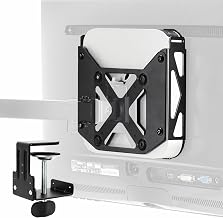
VIVO Behind-Monitor Mac Mini Mount
Covers over a decade of Mac mini models, so it still works even if you upgrade down the line.
A VIVO bracket built for Mac minis from 2010 through the current M-series, with an optional desk clamp.
Fits 2010-2026 modelsDesk clamp optionBehind-monitor mount- ✓Works across many Mac mini generations
- ✓Desk clamp option if you skip the arm
- ✓Keeps the Mac mini totally out of sight
- –Bulkier than mounts made for one model
- –Basic finish, nothing fancy
Amazon →$25approx. - 9★Best Universal Fit

HumanCentric Thin Client Mount
A flexible bracket that fits a wide range of thicknesses, a safe bet no matter your exact Mac mini model.
An adjustable mount that handles devices from under an inch thick to over two and a half inches.
Fits many devicesPole or desk mountStandard mount holes- ✓Adjustable depth fits most Mac minis
- ✓Mounts to a pole or flat surface
- ✓Well-reviewed and widely trusted
- –Not Mac mini specific, more generic
- –Straps can loosen over time
Amazon →$27approx. - 10★Best Budget Mount

Monzlteck VESA Adapter Plate
A cheap, simple plate that turns almost any monitor arm into a spot to hide your Mac mini M4.
A basic extension bracket that adds standard mount holes so your Mac mini can bolt onto nearly any arm.
Universal mount holesFits M4 Mac miniBudget price- ✓Cheapest way to mount a Mac mini
- ✓Simple pattern fits most arms
- ✓Light and easy to install
- –Feels less solid than all-metal mounts
- –No cable management built in
Amazon →$16approx.
Mac mini deals,
every Sunday.
No spam. Unsubscribe anytime.