This guide contains affiliate links. We may earn a commission on purchases at no cost to you. Learn more
Best Ergonomic Keyboards for Mac mini
Top ergonomic keyboards for Mac mini users who want comfort without sacrificing productivity. Split layouts, wrist rests, and wireless connectivity.
- 1★Best Overall

Logitech Ergo K860
The gold standard split keyboard that actually fixes wrist strain instead of just claiming to.
A proper split, curved layout with a real wrist rest that keeps your hands in a natural position for hours of typing. Works over Bluetooth or USB with your Mac mini, no fuss.
Split curved layoutWireless or wiredWrist rest included- ✓Noticeably less wrist strain by end of day
- ✓Solid build that doesn't flex or wobble
- ✓Pairs with multiple devices easily
- –Pricier than most on this list
- –Takes a week to adjust to the split layout
Amazon →$150approx. - 2★Editor's Pick

Logitech Wave Keys for Mac
Built specifically for Mac users who want ergonomic comfort without learning a split layout.
A gently curved keyboard with a cushioned palm rest that's genuinely comfortable, plus Mac-specific keys and Easy-Switch for jumping between devices. Good middle ground if a full split keyboard feels like overkill.
Cushioned palm restMac keys built inMulti-device switching- ✓Comfortable out of the box, no adjustment period
- ✓Palm rest actually stays put
- ✓Easy-Switch works reliably between Mac and iPad
- –Not a true split design for max ergonomics
- –Bluetooth only, no wired option
Amazon →$70approx. - 3★Best Value

Perixx PERIBOARD-512B
A no-nonsense wired split keyboard that's been a reliable pick for years at a fair price.
Old-school wired split keyboard with a real wrist rest and nearly 10,000 ratings backing it up. Not fancy, just does the ergonomic job for less money.
Split keyboardWired USBWrist rest- ✓Very reliable connection, no dropouts
- ✓Wrist rest is firm and supportive
- ✓Priced way below most ergonomic keyboards
- –Bulkier than wireless options
- –Looks dated compared to newer designs
Amazon →$40approx. - 4★Best Budget

Arteck Split Wireless Ergonomic
A wireless split keyboard that gets the ergonomic basics right without breaking the bank.
Cushioned wrist and palm rest with a real split layout, connecting over 2.4G wireless instead of Bluetooth. Good option if you want split comfort without spending premium money.
Split designWireless 2.4GCushioned rest- ✓Comfortable cushioned rest for long sessions
- ✓Good battery life on wireless connection
- ✓Split layout genuinely reduces wrist twist
- –Uses a USB dongle instead of Bluetooth
- –Keys feel a bit mushy compared to pricier picks
Amazon →$55approx. - 5★Best Compact

EK04 Mini Split Wireless
A compact split keyboard for anyone who wants ergonomic comfort in a smaller desk footprint.
Shrinks the split ergonomic layout down into a mini frame with a hard palm rest, good for smaller desks or minimalist setups next to the Mac mini.
Compact split layoutHard palm restRechargeable battery- ✓Takes up way less desk space than full split boards
- ✓Palm rest is firm and stays in place
- ✓Rechargeable battery skips the AA replacement hassle
- –No number pad if you need one
- –Smaller keys take some getting used to
Amazon →$47approx. - 6★Best Budget Split

RT07B Wireless Ergonomic Split
A budget split keyboard that covers Bluetooth and USB connections in one package.
Straightforward split ergonomic layout with a wrist rest and the flexibility to connect via Bluetooth or a USB receiver, whichever your Mac mini setup needs.
Split layoutBluetooth or USBWrist rest- ✓Flexible connection options for different setups
- ✓Wrist rest holds up well over long use
- ✓Solid rating history for the price
- –Build feels a bit plasticky
- –Fewer reviews than the bigger brand options
Amazon →$33approx. - 7★Best Wired for Mac

Wired Curved Keyboard for Mac
A wired, curved ergonomic keyboard made to match Apple's keyboard layout with backlit keys.
Curved key layout with a wrist rest, backlighting for dim rooms, and Mac-friendly key mapping. Good pick if you want ergonomic comfort without giving up a wired connection.
Curved layoutBacklit keysWired connection- ✓Backlighting helps in low-light home offices
- ✓Curved shape eases hand strain over time
- ✓Wired means zero lag or pairing issues
- –Cable limits desk placement flexibility
- –Fewer reviews than more established brands
Amazon →$70approx. - 8★Best Dual-Mode

Split Wireless Keyboard for Mac
A dual-mode split keyboard built for Mac devices, with both Bluetooth and USB-C wired options.
True split ergonomic design with a wrist cushion, plus the option to go wireless or plug in with USB-C, giving Mac mini users flexibility depending on the setup.
Split designBluetooth or USB-CWrist cushion- ✓Switching between wired and wireless is simple
- ✓Wrist cushion adds real comfort during long typing
- ✓Works across Mac, iPad, and iPhone
- –Lower review count than bigger name brands
- –Rating is a bit mixed compared to top picks
Amazon →$65approx. - 9★Best Backlit
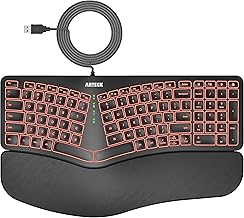
Arteck Backlit Split Wired
A wired split keyboard with adjustable backlighting for anyone who works in low light.
Split ergonomic layout with a long 6-foot cable and seven backlight colors, aimed at desk setups where you want both comfort and visibility in the dark.
Split layout7-color backlight6-foot cable- ✓Long cable gives real placement flexibility
- ✓Backlight colors are genuinely adjustable
- ✓Wrist and palm rest feel solid, not flimsy
- –Wired only, no wireless option
- –Backlight can drain if left on constantly
Amazon →$60approx.
Mac mini deals,
every Sunday.
No spam. Unsubscribe anytime.